Sharing Sensitive Information Safely: The Knowledge Base That Works for Everyone
In plain English
The problem I had: I needed a way to share my knowledge base publicly, but some of that content is internal only. I didn't want to manage two separate versions of the same document.
What I built: A simple tagging system. I mark private sections with <int> tags in my source document. I can also mark entire documents as internal-only, so I don't need to tag individual sections. It's flexible both ways. The system automatically splits content into external and internal chunks. When someone accesses my knowledge base without logging in, they only see the external sections. If they're an admin, they see everything.
The outcome: My knowledge base is now live and shareable. Zero risk of accidentally leaking internal content. One source of truth, multiple access levels.
Demo
1. Click here to open the BizBrains web front-end.
2. Where it says "Ask a question" type "Reauthorizing Google accounts?" and press Enter.
3. BizBrains will take a few seconds to think and then respond with information and links.
4. Click an orange link to see the source document displayed in the document viewer.
Nerd Speak
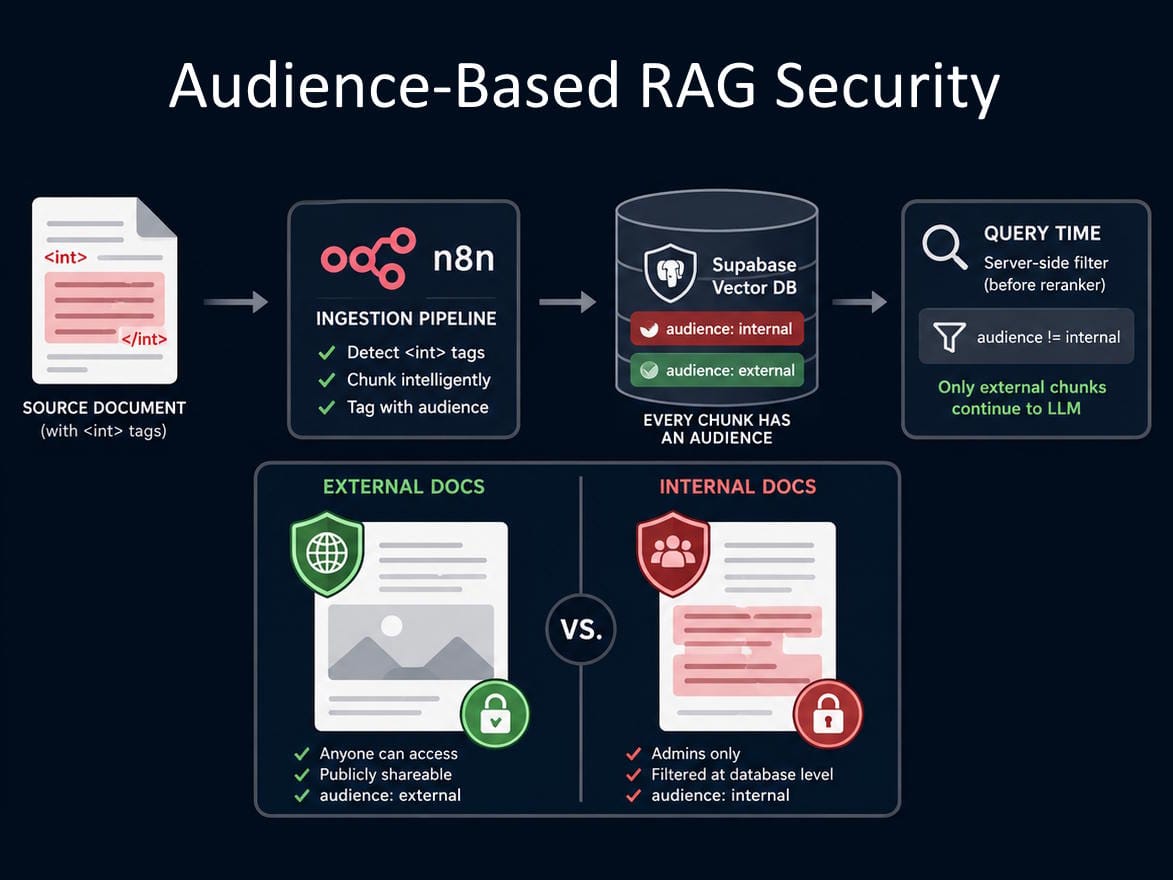
I figured out how to add audience-based security to my RAG pipeline in n8n. No extra infrastructure. Just metadata and a chunk strategy.
Here's the problem I was solving:
BizBrains is my personal knowledge base. Some of the content is fine for anyone to read. But some of it is internal only. I needed a way to share a document publicly while keeping sensitive sections private, without maintaining two versions of the same doc.
The solution ➜ <int> tags + audience metadata
I wrap any private content inside <int></int> tags directly in the source document.
When the ingestion pipeline runs in n8n, it detects those tags and does two things:
1. Chunks the content inside the tags as its own separate chunk
2. Tags that chunk with audience: internal in the vector database
Everything outside the tags gets chunked normally at 500 characters and tagged audience: external.
From now on, every single chunk sitting in Supabase has one of two audience values (internal or external). That's it.
What this means at query time:
When a non-logged-in user asks a question, the retrieval query filters out any chunk where audience = internal (before it even gets to Cohere Reranker).
The LLM never sees it. The response never contains it. The redaction is enforced at the database level, not at the prompt level.
And because the filtering happens at the database level, prompt injection attacks don't work here. There's no access level sitting inside the LLM's system prompt for a malicious query to manipulate. The audience filter is applied before the LLM is involved at all ➜ in the Supabase query itself, using a server-side value the user has no way to touch.
How the admin password is secured:
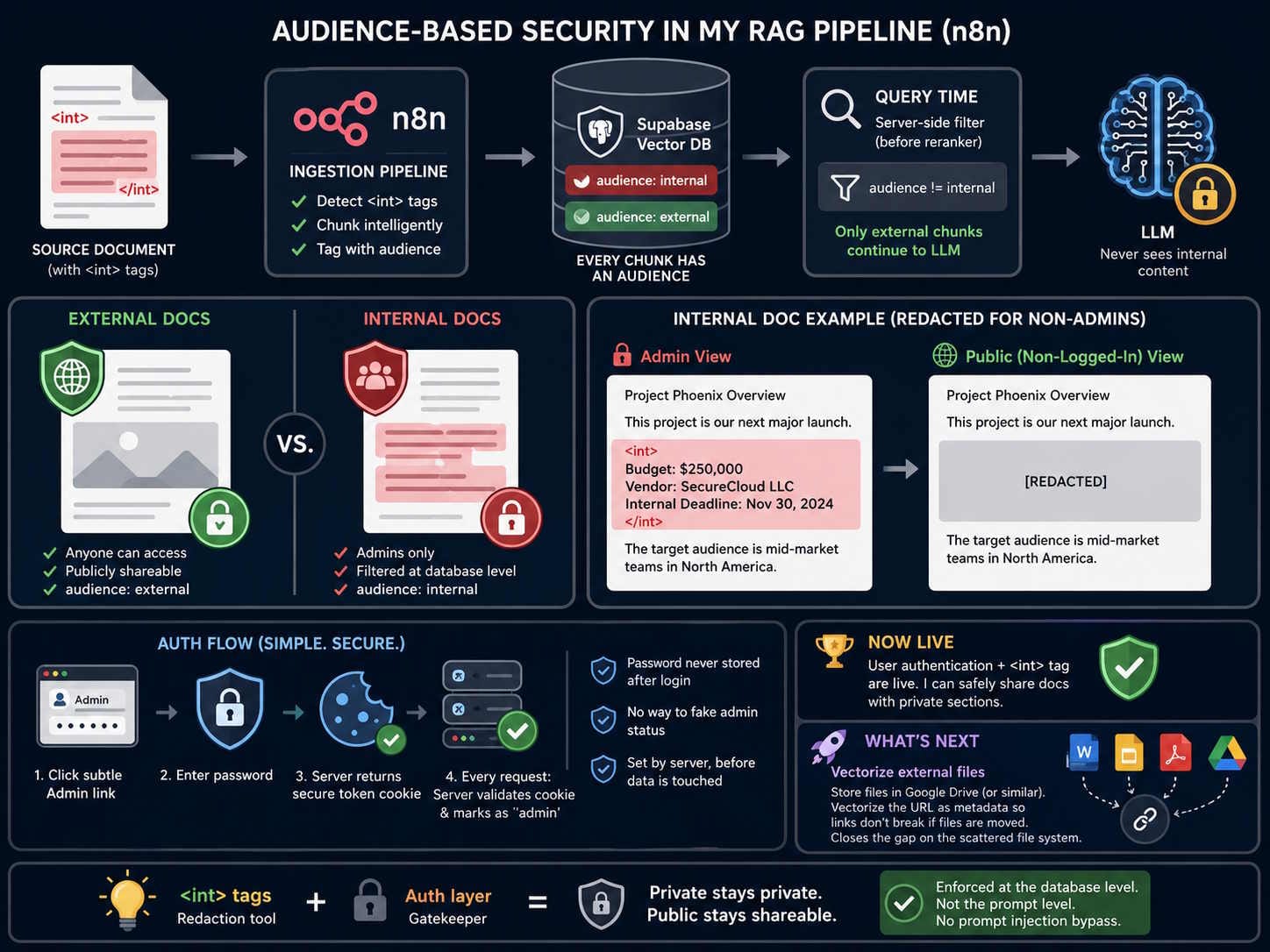
I kept auth simple. There's a subtle Admin link on the interface. Click it, enter the password, done.
Under the hood, the password is never stored anywhere after you log in. Instead the server hands back a secure token that sits in a cookie your browser holds onto. Every time a request is made, the server checks that cookie. If it's valid, it privately marks the request as 'admin' before passing it on to anything else.
There's no way for a user to fake that mark. It's set by the server, after your request arrives, before your data is touched. 🙌
Now Live:
User authentication and the <int> tag are now implemented and live.
I can start publicly sharing BizBrains documents that contain private sections, with zero risk of leaking the internal content.
The <int> tags are my redaction tool. The auth layer is the gatekeeper. The two work together.
What's Next on the Roadmap:
Vectorizing external files ➜ For content that needs to stay in its original file type (i.e. Docx, Google Slides, Image, PDF etc.), they will need to permanently live outside of the BizBrains tables such as in Google Drive. I'll vectorize the URL as metadata because unlike the file path, the URL won't break if it's moved. Until I implement this, my original problem of a scattered file system will still exist.

Mark Reynolds
Learning by Building
What’s Mark Building?
Want to see what I’m building next? Join my email list and I’ll send my latest builds, messy updates, and solutions straight to your inbox.
QUICK LINKS
MARK REYNOLDS
I use AI to build custom tools that handle my boring, repetitive tasks. I’m on a mission to optimise my workflow and help you do the same.
Created with ©systeme.io