I Built a Knowledge Base That Manages Itself: From Filing Chaos to Smart RAG
In plain English
The problem I had: I was drowning in scattered files. Google Drive, PCloud, Documents, Coda, Keep. I'd start organized but after starting and dropping ideas, my filing system became chaos. I'd spend way too much time trying to remember where I'd saved something.
What I built: A self-managing knowledge base called BizBrains. I started with a Google Sheet that tracks every document I add: title, description, tags, category, and status. When I add a PDF to a specific folder, an n8n workflow vectorizes it and stores it in Supabase. If I ever need to remove a document, I change its status to "Remove" and the system automatically deletes all its chunks from the vector store. No orphaned data. No manual cleanup.
Then I rebuilt it using Claude Code to create a Coda-based version that's faster and cleaner. I added a Chrome Extension so I can trigger updates with one click. I can mark documents as "Knowledge" (chunks and vectorize) or "Guides" (keep whole, link back to original). I also added user authentication so I can eventually share it publicly without leaking internal content.
The outcome: A living, self-managing knowledge base. I add files, the system handles the rest. No more wondering what's where. The system keeps itself clean and honest about what it contains.
Nerd speak
I spend a lot of time trying to remember where I've saved files and notes. Was it Google Drive? PCloud? My Documents? Coda? Keep? Bugger.
I start out super organised but after starting and dropping many ideas, my filing system morphs into filing chaos.
In mid 2025 I started learning n8n with this challenge as my muse.
The working title was BizBrains and phase one was to create a living RAG knowledge base. What differed between my RAG system and the many versions I'd seen was that I setup a Google Sheet to track and manage which files were vectorised and also acted as a remote control for the n8n vectorisation process. Everyone else's version was just throwing file after file into the vector store with no thought for how to know what's in there, let alone how to easily remove files when they become obsolete!
My Google Sheet tracked each document's title, description and tags, a category... and used this as 'metadata' during vectorisation. It had a Status column such that if I changed its value to "Remove", all the vectorised chunks for that document would be automatically removed from the Supabase vector store via an n8n workflow. Files were ingested by adding PDFs into a specific Google Drive folder and running an n8n workflow. Cohere Reranker was then employed to retrieve the most accurate results by checking against the metadata.
BizBrains V1
The working title was BizBrains and phase one was to create a living RAG knowledge base. What differed between my RAG system and the many versions I'd seen was that I setup a Google Sheet to track and manage which files were vectorised and also acted as a remote control for the n8n vectorisation process. Everyone else's version was just throwing file after file into the vector store with no thought for how to know what's in there, let alone how to easily remove files when they become obsolete!
My Google Sheet tracked each document's title, description and tags, a category... and used this as 'metadata' during vectorisation. It had a Status column such that if I changed its value to "Remove", all the vectorised chunks for that document would be automatically removed from the Supabase vector store via an n8n workflow. Files were ingested by adding PDFs into a specific Google Drive folder and running an n8n workflow. Cohere Reranker was then employed to retrieve the most accurate results by checking against the metadata.
BizBrains V2
Even though that solution worked well, I knew I could do better.
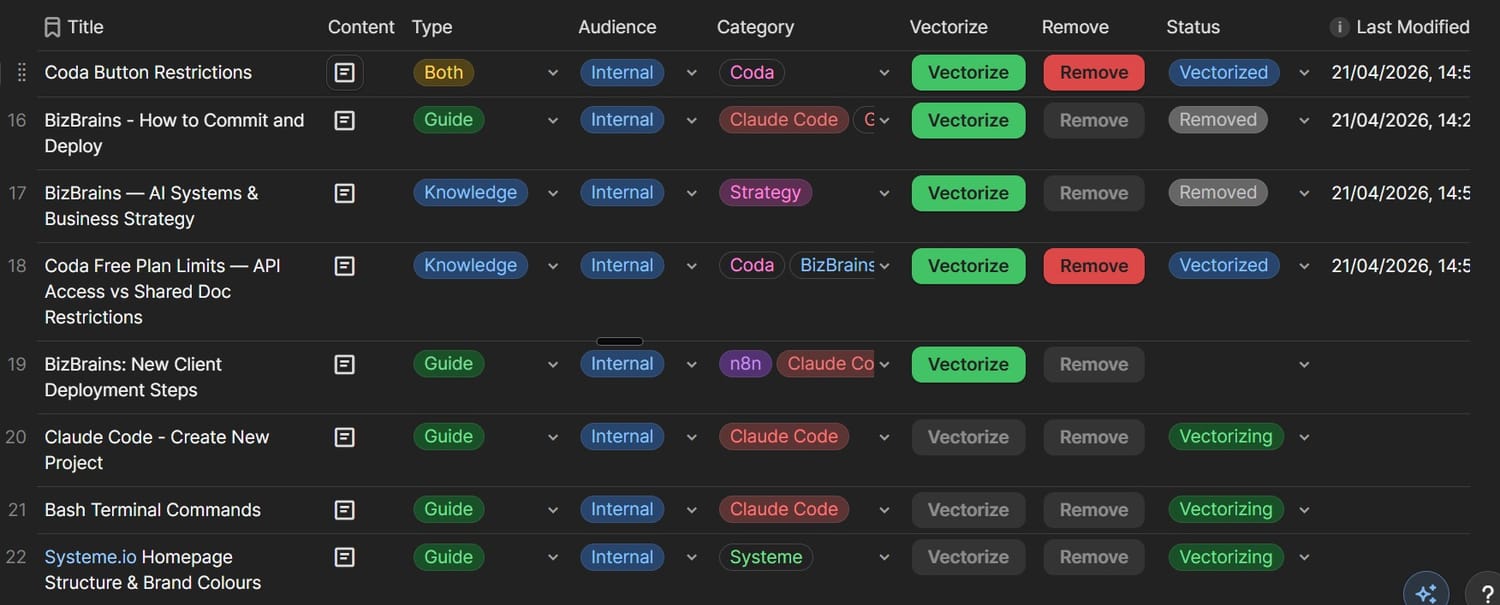
In April 2026, I learned how to vibe code apps and n8n workflows using Claude Code. Then, in one week, AI helped me recreate BizBrains V2 with a Coda table as both the document source and remote controller while also streamlining the solution from six workflows down to four.
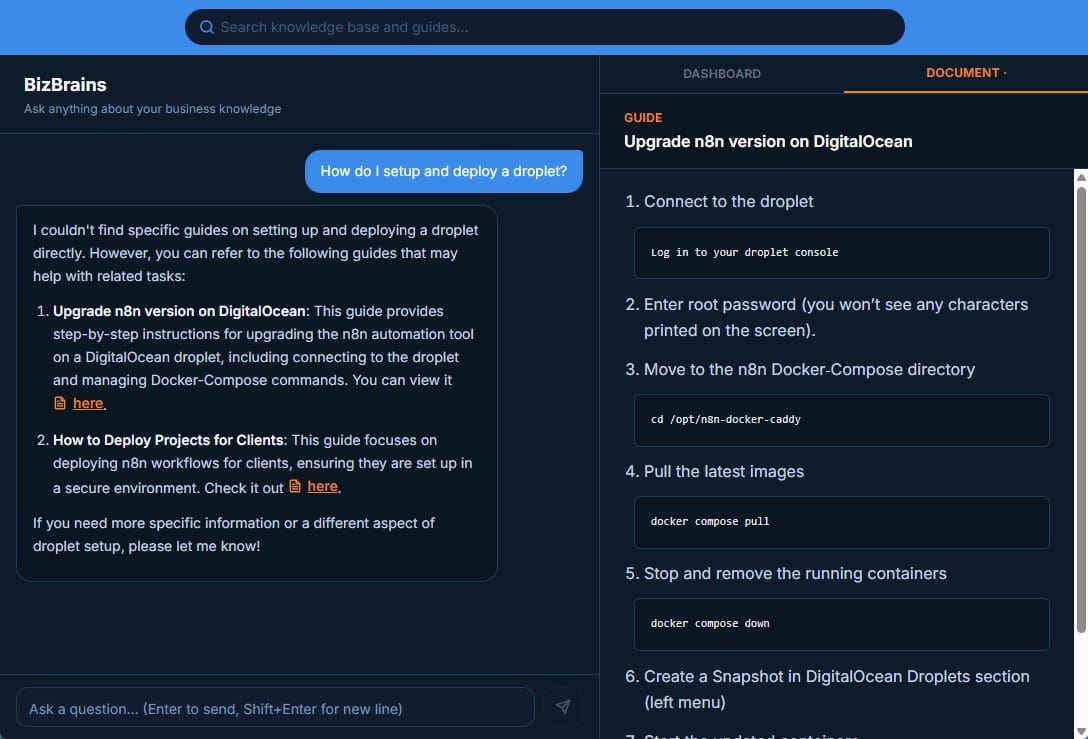
In week two, I worked with Claude to create a user front end for querying the vector store.
But I didn't stop there. I added extra features:
Added two types of documents: Knowledge and Guides. Knowledge documents are chunked down and vectorised whereas Guides were stored whole and I only vectorise its metadata.
Reason: Guides are Step by Step instructions - so it's best to view the original version. When a query retrieves a Guide as the response, it provides a link to the whole document. When the user clicks on it, it opens in the document viewer in the right-side pane.Added an Audience column to future proof it for internal and external use.
Added Coda buttons to change the Status making it more user friendly.
Created an Instant Webhook Chrome Extension so that I could manually trigger the n8n workflow to check the Status column for any rows that have been set to "Vectorising" or "Removing" and then process them accordingly, updating the status afterwards.
Roadmap
BizBrains does not yet solve my original problem of a scattered file system, so I've got the following updates in mind, listed in no particular order:
Internal tags <int></int> ➜ This feature will provide the ability to publicly share a document that has private information, simply by redacting the private content. To do this, I will create and place <int></int> tags around the private content. Only logged in will see the redacted content.
User Authentication ➜ Needed to delineate between who's accessing the BizBrains front-end: me or an external person. Authentication is required before I can implement the internal tags (above).
Move table online ➜ Using a Coda table is not without its problems. So I would like to build the Coda table solution into the front-end, after User Authentication has been implemented.
Folder Tree View ➜ Human brains like to compartmentalise by separating documents into logical hierarchies. So, I'll look at implementing a Folder Tree View which is really just an extra metadata field for a directory path.
Vectorizing external files ➜ For content that needs to stay in its original file type (i.e. Docx, Google Slides etc.), they will need to permanently live outside of the BizBrains tables such as in Google Drive. I'll likely vectorize their URL as part of the metadata. Until I solve this, my original problem of a scattered file system will still exist.
Stay tuned for updates.

Mark Reynolds
Learning by Building
What’s Mark Building?
Want to see what I’m building next? Join my email list and I’ll send my latest builds, messy updates, and solutions straight to your inbox.
QUICK LINKS
MARK REYNOLDS
I use AI to build custom tools that handle my boring, repetitive tasks. I’m on a mission to optimise my workflow and help you do the same.
Created with ©systeme.io