I Built a Chrome Extension With ChatGPT in Under an Hour — Here's How It Went
Early last week I dove back into building n8n workflows again and working on a new and improved version of the 'Biz Brains' RAG solution I built last year.
Then on Thursday I came up with an idea to create a Chrome Extension to allow myself/clients to manually trigger workflows via webhooks instead of the workflow having to repeatedly poll a Coda Table or Gmail Inbox all day long.
I turned to ChatGPT and gave it instructions to create the extension to be vanilla and configurable for each person that installs it. I explained in detail how I wanted the user interface to function and why to give it context.
After some back and forth, ChatGPT wrote the code for 3 files: manifest.json, popup.html, and popup.js
How I Tested:
1. Created a folder and added those 3 files to it.
2. Loaded it into Chrome
2.1 Went to: chrome://extensions/
2.2 Turned on Developer Mode
2.3 Clicked 'Load Unpacked'
2.4 Selected my folder
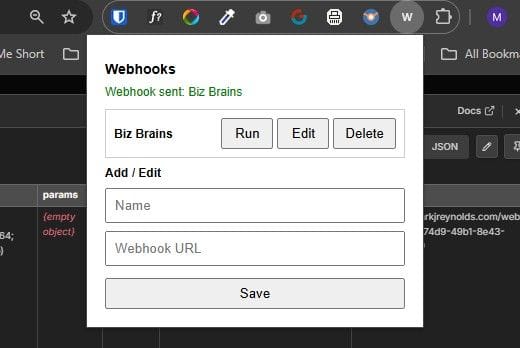
3. Now a new "W" icon appears in my extensions list ➜ Pinned it
4. Clicked the extension to display the menu
4.1 Added name and webhook URL, then clicked Save
4.2 Now I click 'Run' next to the webhook name I want to fire off
Build Results:
First version ➜ icons displayed as unreadable garbage text.
Second version ➜ resulted in crashing chrome completely.
Third version ➜ worked like a charm!
I iterated through each version by simply uploading a screenshot of the issue and explaining what was happening.
The process took perhaps 45-60 mins.
Impact:
A client can trigger a workflow to fire anytime they want. So, if I've built them a RAG system to ingest their company's knowledge and they've just added a new file that needs to be accessible via a public facing chat interface on their website, they can trigger the workflow to ingest it immediately. Normally you'd have to set a pre-determined poll such as every 1 minute, 5 minutes, or 30 minutes etc.
Next Step:
During testing I've been loading the Chrome Extension in Developer Mode. Now I need to add it to the Chrome Web Store so that:
1) The extension doesn't disappear every time I restart Chrome.
2) It permanently saves my webhook entries.
3) I can quickly and easily install it for any client.
15/04/2026 Update ➜ I've now added my Instant Webhook extension to the Chrome Web Store and you can get it here.

Mark Reynolds
Learning by Building
What’s Mark Building?
Want to see what I’m building next? Join my email list and I’ll send my latest builds, messy updates, and solutions straight to your inbox.
QUICK LINKS
MARK REYNOLDS
I use AI to build custom tools that handle my boring, repetitive tasks. I’m on a mission to optimise my workflow and help you do the same.
Created with ©systeme.io